
AI Coding
Codex Subagent Models: Keep Judgment on the Main Thread, Send Repeat Work to Cheaper Tiers
How to assign GPT-6.1 Sol, GPT-6 Astra, and GPT-6 Luna to Codex subagents by role, which setting wins, and which reasoning levels each model supports.

When this note was first written in August 2026, OpenAI’s GPT-5.6, released in July 2026, came in three tiers: Sol, Terra, and Luna. In late September 2026, Codex moved to the GPT-6 family. Codex CLI 0.157.0 added GPT-6 Sol and GPT-6 Luna on September 25, and GPT-6.1 Sol shipped on September 29. As of October 2026, the Codex docs recommend three models. GPT-6 Astra is the most capable. GPT-6.1 Sol performs close to Astra at a lower cost, and the docs name it the starting point for most tasks. GPT-6 Luna is the fastest and cheapest, for well-scoped, repeatable, high-volume work. The GPT-5.6 tiers remain selectable during the rollout. Codex lets you assign a different model and reasoning level to each subagent role, so the question becomes how much judgment each role needs. You answer it in config files.
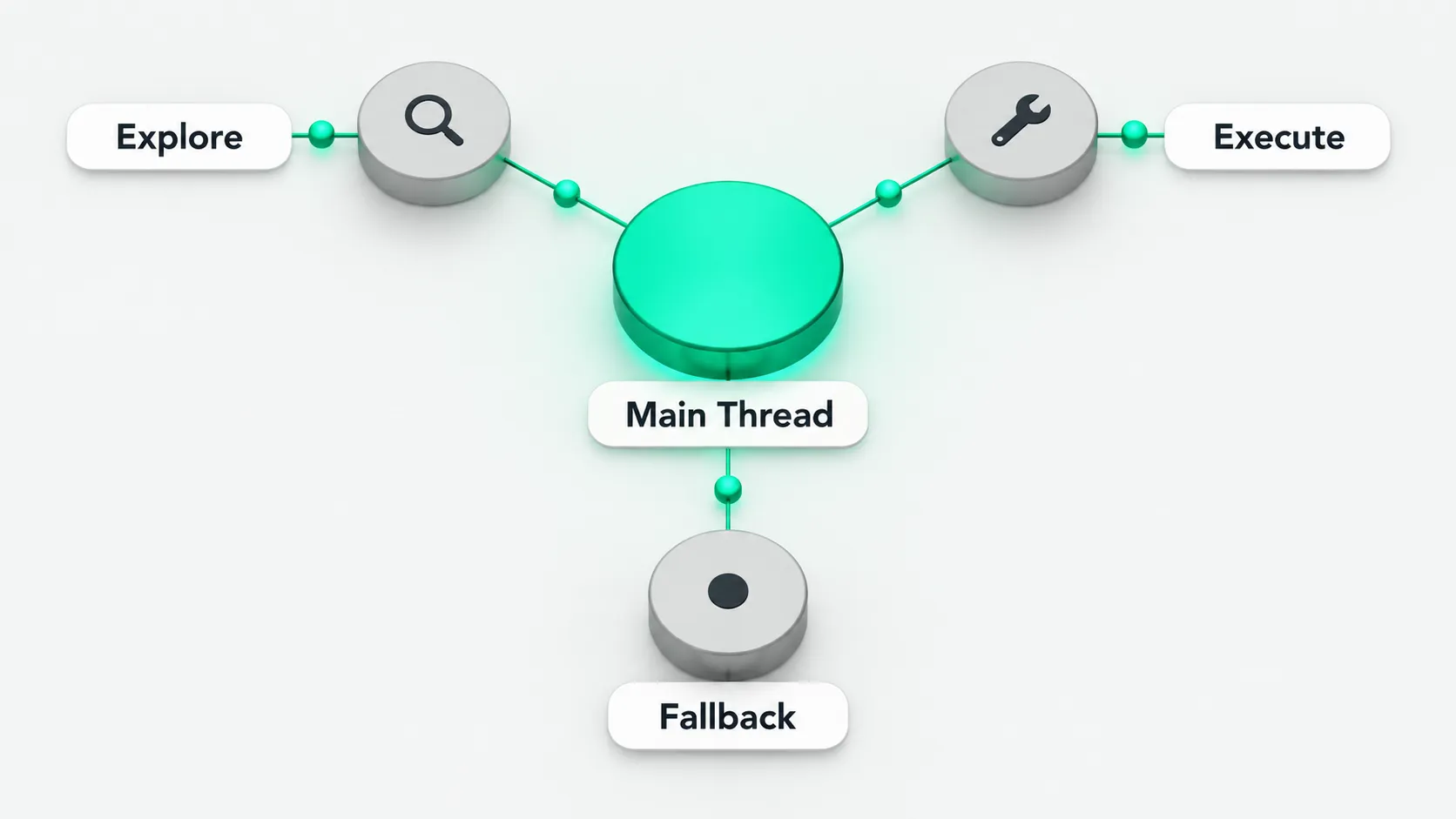
The main thread decides, subtasks execute
The main thread scopes the work, breaks it into tasks, and merges the results. If it gets one of these steps wrong, every subtask downstream works from a bad premise. That makes the strongest tier worth paying for here. Subtasks take work that is well scoped, repeatable, and parallel. Codex ships with three built-in roles: explorer handles read-heavy codebase exploration, worker handles implementation and fixes, and default is the general-purpose fallback. A single mistake in one of these tasks costs little, but they run in volume. Configure them for speed and cost first.
The docs split the models the same way. Use gpt-6.1-sol for ambiguous, multi-step work that needs planning, tool use, and validation. Use gpt-6-luna for narrowly scoped, clear, repeatable, or high-volume work. Use gpt-6-astra for the hardest end-to-end work.
The same logic applies to deciding how much authority an agent gets. AI Agent Security Governance Must Come Before Scaling covers which production decisions stay with people and which an agent can execute on its own. In a local dev tool, the question becomes which decisions stay on the main thread and which go to a cheaper execution tier. In both cases, the cost and consequences of a decision determine where resources go.
Two config layers: global defaults and per-role files
Global defaults go in ~/.codex/config.toml (personal) or .codex/config.toml in the repo (project). Codex loads project layers only when you trust the project. When there are several project layers, they are ordered from the project root down to the current directory, and the closest one wins.
model = "gpt-6.1-sol"
model_reasoning_effort = "high"

[agents]
default_subagent_model = "gpt-6-luna"
default_subagent_reasoning_effort = "high"
max_concurrent_threads_per_session = 6
max_concurrent_threads_per_session caps how many subagent threads can be open at once, not counting the main thread. If you leave it unset, Codex picks the default. Older configs may use max_threads, which is a legacy alias. For the hardest tasks, switch the main thread’s model to gpt-6-astra.
Per-role settings live in separate TOML files under ~/.codex/agents/ (personal) or .codex/agents/ (project). Each file defines one agent. Three fields are required: name, description, and developer_instructions. The optional model fields are model, model_reasoning_effort, model_reasoning_summary, and model_verbosity.
.codex/agents/luna-worker.toml:
name = "luna_worker"
description = "Default choice for well-scoped, repeatable, parallel subtasks."
developer_instructions = """
Execute exactly within the assigned task scope.
Return only the result or brief evidence. Do not expand the scope.
"""
model = "gpt-6-luna"
model_reasoning_effort = "high"
Sandbox and approval settings do not belong in the agent file. The docs state that subagents inherit the parent session’s current sandbox and approval settings. Putting sandbox_mode, approval_policy, model_provider, or mcp_servers in an agent file does not override the parent. To narrow what an agent can do, set feature flags such as features.shell_tool to false.
As of October 2026, the docs do not say whether you need to restart Codex or open a new session after changing these files.
Precedence
A subagent’s model and reasoning level are resolved in this order, highest first:
model/model_reasoning_effortin that role’s agent file;- A value set explicitly at spawn time, for example when your prompt asks for a specific model or level;
default_subagent_model/default_subagent_reasoning_effortunder[agents];- The parent session’s (main thread’s) own model and level.
Two details. If the spawn request or [agents] picks a model but no reasoning level, the subagent uses that model’s default level, not the parent’s. If an agent file sets model but no level, it keeps the level resolved from layers 2–4. If the chosen model does not support that level, set model_reasoning_effort in the agent file as well.
To skip the config files and override a single run, use CLI flags:
codex exec -m gpt-6.1-sol -c model_reasoning_effort=high "review this diff for correctness"-m overrides the model. -c overrides any config key as key=value, and the value is parsed as TOML. Both apply only to that invocation. CLI flags rank first in Codex’s config precedence, above project and personal config.toml files.
A common misconfiguration: reasoning levels depend on the model
The values model_reasoning_effort accepts depend on the selected model. The docs list low, medium, high, xhigh, max, and ultra, and say the available levels depend on the model and client. GPT-6 Luna supports levels up to max but not ultra. GPT-6.1 Sol ranges from Light to Ultra, and whether max and ultra are available depends on your settings. ultra uses subagents to work on separate parts of a complex task in parallel. minimal is not among the listed values. As of October 2026, the docs do not say what happens if you set a level the model does not support.
The docs’ starting points for explicit settings: high for Luna, low for Astra, and for Sol, the client’s default level adjusted to the task. Levels do not map exactly between model generations, so test configs carried over from GPT-5.6 on a task you know.
Configured or not, the difference is money and time
Putting every role on the most expensive tier costs more money and more waiting. Putting every role on the cheapest tier lowers judgment quality, most visibly when the main thread scopes work and merges results. The docs also state that each subagent does its own model and tool work, so subagent workflows use more tokens than a comparable single-agent run. The subagents’ tier sets how large that extra cost is. Tiered config puts expensive judgment on the main thread and cheap execution on the subtasks. Moving Codex from personal use into a team’s engineering workflow also requires working through boundaries, verification, and collaboration. See What Does It Take to Make Codex Part of Your Team’s Dev Workflow?.