
AI Coding
Qwen3.8 VRAM Requirements: Which Quantization Level for 27B?
Check Qwen3.8-27B VRAM and memory needs against Unsloth's official hardware table: 4-bit needs 16-19 GB, 1-bit to 3-bit need 7-14 GB, and higher-precision levels need 23-56 GB. Pick the quantization level that matches your total memory.

Qwen3.8 VRAM needs set which quantization levels of the 27B model you can use on a local machine. The level choices here come from the hardware threshold table in Unsloth’s Qwen3.8 guide, and the weight files are published in the unsloth/Qwen3.8-27B-GGUF repository. This note checks the VRAM and total system memory threshold for each quantization level. For local installation and build steps on a Mac, see Run Qwen3.8-27B Locally on Mac with Unsloth.
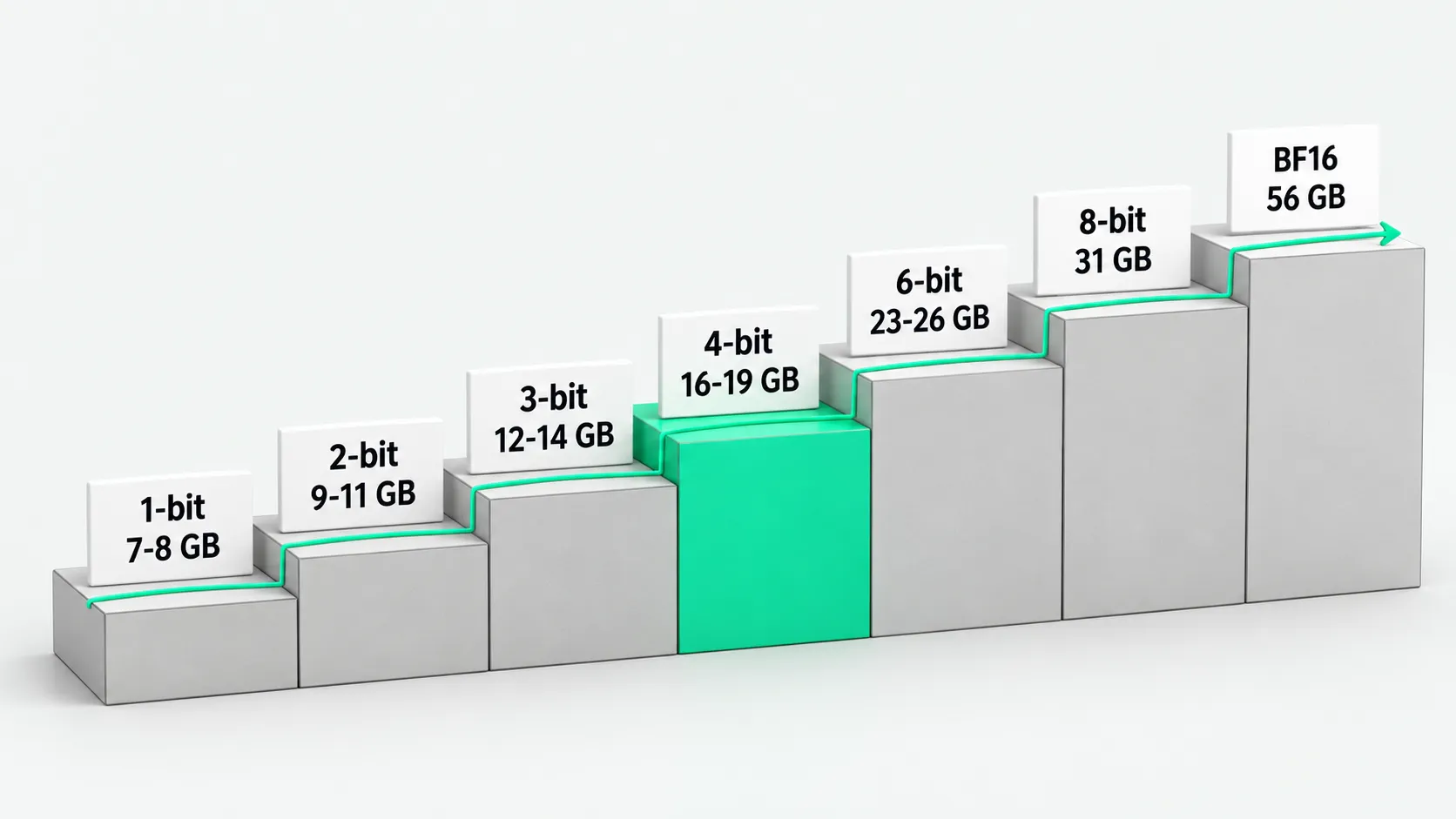
Official VRAM threshold table
| Quantization level | 1-bit | 2-bit | 3-bit | 4-bit | 6-bit | 8-bit | BF16 |
|---|---|---|---|---|---|---|---|
| Requirement | 7-8 GB | 9-11 GB | 12-14 GB | 16-19 GB | 23-26 GB | 31 GB | 56 GB |
Data from Unsloth’s Qwen3.8 guide. Each value is the minimum total memory needed to run that level. The measure is total memory (RAM plus VRAM with a discrete GPU, or unified memory on Apple Silicon). In pure GPU inference, the value is the GPU’s own VRAM. In mixed offload, it is the combined allocation of system RAM and VRAM. On a Mac, it is the whole machine’s unified memory.
How to pick a level by total machine memory
- 16-19 GB of memory: choose 4-bit. The common baseline for running Qwen3.8-27B locally is an environment with 17 GB of RAM/VRAM. The 4-bit level covers the 16-19 GB range and suits an RTX 5080, an RTX 4090, or a Mac with 24 GB of unified memory.
- Less memory: choose 1-bit to 3-bit. With 7-14 GB available, step down by your memory ceiling to 1-bit (7-8 GB), 2-bit (9-11 GB), or 3-bit (12-14 GB). Per the August 19, 2026 update, Unsloth GGUF uses Unsloth Dynamic V3.0, which gives about 10% higher accuracy than standard quantization at the same size.
- Near-original precision: choose 6-bit or 8-bit. Original precision: choose BF16. With plenty of VRAM, choose 6-bit (23-26 GB), 8-bit (31 GB), or BF16 (56 GB). A 24 GB VRAM card on the Blackwell architecture can also run the NVFP4 level, at about 1.5 times BF16 inference speed.
- Multi-token prediction needs 1-2 GB more. Qwen3.8-27B supports a native context length of 262,144 (extendable to 1M with YaRN). If the inference engine turns on multi-token prediction (MTP), reserve another 1-2 GB of VRAM beyond the weight memory above.
How this note and the “run it on a Mac” note divide the work
- Threshold note (this note). It checks the hard VRAM and unified memory thresholds for each 27B quantization level, for hardware assessment and choosing a level.
- Hands-on note (the Mac note). It covers environment setup on Apple Silicon, desktop steps, building llama.cpp, and Metal runtime parameters. This note does not repeat the install commands or sampling settings.
Call an API when local memory is not enough
Baize API offers OpenAI-compatible model endpoints. When local RAM or GPU VRAM is below 16 GB, you can call Qwen 3.8 Max through it instead of loading 27B weights on your machine. Check the model ID and price on the Models page.
If you plan to buy high-VRAM hardware to deploy 27B locally for domain-specific fine-tuning, check before buying whether your business facts change often, and assess a knowledge base retrieval approach. See Fine-Tuning vs. RAG: Connect the Enterprise Knowledge Base First.
Qwen3.8 VRAM: FAQ
For Qwen3.8-27B, does the VRAM threshold mean GPU VRAM only, or does it include system memory?
Unsloth’s official hardware table measures total memory (RAM plus VRAM, or unified memory on Apple Silicon). With a discrete GPU, if the model weights load fully into the GPU, the 16-19 GB threshold refers to the GPU’s VRAM. With mixed CPU and GPU layer offload, it refers to system RAM plus VRAM. On a unified memory architecture, the whole system shares one memory space, and the system and resident processes still take a base share.
At the 16-19 GB level, will long context or MTP exceed the VRAM limit?
The 4-bit level covers the 16-19 GB range. According to Unsloth, enabling multi-token prediction (MTP) needs 1-2 GB of extra VRAM. Qwen3.8-27B supports a native context of 262,144 (extendable to 1M with YaRN), and long context also takes VRAM. On a 16 GB GPU or a 24 GB unified memory machine, reserve room for MTP and context so long inputs do not run out of VRAM.
With less than 16 GB of VRAM, should I pick a very low-bit 27B level or switch to a smaller model?
Unsloth provides 1-bit (7-8 GB), 2-bit (9-11 GB), and 3-bit (12-14 GB) levels, and its August 19, 2026 update moved to Unsloth Dynamic V3.0, with about 10% higher accuracy than standard quantization at the same size. On an 8 GB or 12 GB GPU, a 27B quantized level lets you load the 27B model on a single card, but Unsloth has not published quality comparisons across levels. When you need stable quality, prefer 4-bit or higher. If the work needs full precision and VRAM falls short, use a cloud API instead.