
Enterprise AI
AI Revises the Work Instruction: Who Signs Off the New SOP Version?
When manufacturers use an AI work instruction tool to help revise process documents, the AI compares drawings, process cards, the current instruction, and past nonconformance records and assembles a revision package. Authorized staff still author, review, approve, and release the SOP version under the controlled document process.

In a process revision, an AI work instruction tool only compares document differences and drafts the revision package. The new version is still released by the process or technical lead the company has authorized. Under the quality management system, a work instruction is a controlled document. A workstation may only hold the SOP version currently in force, and old versions are withdrawn promptly. The process engineer checks the revision package line by line and is responsible for its content. The quality engineer reviews inspection frequency, nonconformance handling, and safety requirements. A formal SOP version number is created only after the approver signs. AI drafts do not get a version number and do not go to the shop floor. Before the new version takes effect, affected roles complete training and confirm it, and the old version is withdrawn at the same time.
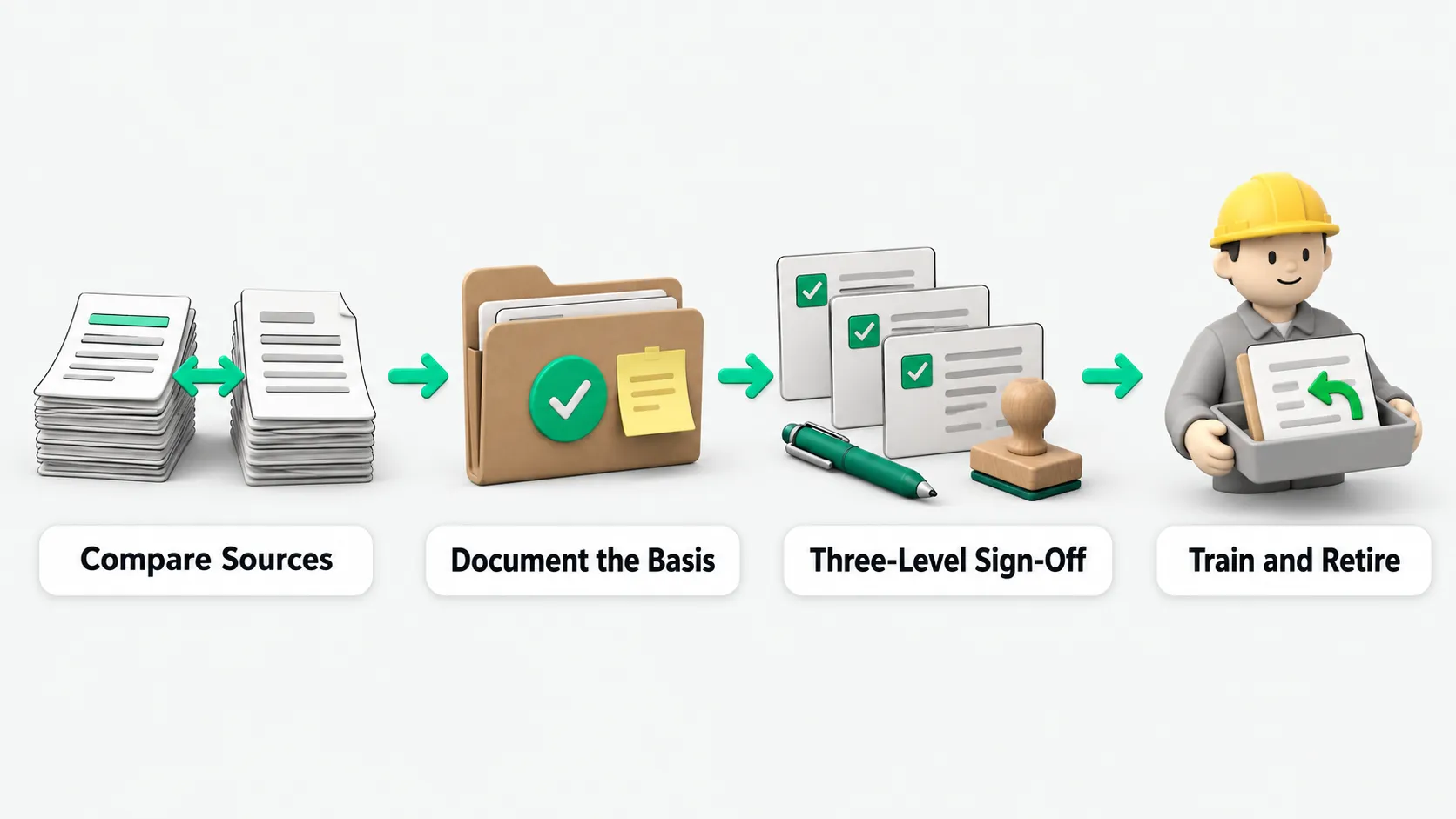
What the AI does first in a revision
Molds change fast on the shop floor, and change approval takes several days, so work instructions often lag behind the line. Drawings and process cards change, and the instruction is left as it was. The text keeps vague phrases such as “torque as appropriate”, “apply a small amount”, and “by experience”. The same parameter causes repeated nonconformances, and each fix stays local instead of being written back into the instruction. At audit time, auditors compare the instruction at the workstation with the drawings and the control plan. Common findings are parameters that do not match, missing inspection frequency, missing nonconformance handling, and missing safety requirements.
During a revision, the AI work instruction tool can be configured to compare the current instruction, the process card, the drawing’s technical requirements, and past nonconformance records line by line. It lists side by side the value of the same parameter in each document, marks the difference, and notes which document governs. It also flags any referenced drawing revision that does not match the revision in force. In one pass it picks out vague wording, parameters with no tolerance, inspection items with no frequency, and empty nonconformance handling sections. It links parameter deviations that caused rework in the past to the matching nonconformance records. The comparison is only accurate once drawings, process cards, and nonconformance records are sorted by version. See Enterprise Context Engineering: Making Company Knowledge Usable by AI Agents. These tools do not promise to generate a releasable instruction straight from the drawing. Parameter values carry safety and liability, so people still make the judgment and sign.
What the revision package must state
After the comparison, the tool can be configured to output a revision package for the process engineer to check. It does not go to the shop floor directly. The package states the changes, the basis for each, the responsible roles, the change description, and the revision level, with a change impact list attached. When the source documents cross a major revision, or many key parameters do not match, the change is classed as a major revision under the company’s own criteria.
- Changes and basis: list the steps, parameter values, tolerances, and inspection items changed in this revision, and name the drawing, process card, or nonconformance record each change is based on.
- Responsible roles and change description: name the workstations and operators affected, and describe what changed and why.
- Change impact list: list which related documents change with it, which roles need retraining, and how old copies on the floor are collected.
- Reasons for items not changed: when the AI flags a difference and a person decides not to change it, the package records the reason.
The process engineer checks parameters and work methods line by line against actual floor conditions. When a corrective action changes a work process, the corrective action record must point to the matching controlled document and the training update.
What authoring, review, and approval each sign for
Controlled documents require a record of who authored, who reviewed, who approved, when the document takes effect, and when it is obsolete. The document at each workstation must match the work actually done there. The AI work instruction tool only compares and drafts. Release goes through three signatures:
- Author signature: the process engineer is the author. After checking every parameter, step, change description, and impact item in the revision package, the engineer signs and is responsible for the content.
- Review signature: the quality engineer checks that inspection frequency, nonconformance handling, and safety requirements are complete, and signs once they are correct.
- Approval signature: the process or technical lead the company has authorized approves. A major revision gets additional signatures as company rules require.
For the pattern where the tool does the impact analysis and a person signs the release, see AI Agents in IT Change Review: Which Steps Still Need a Human Sign-Off?. A new SOP version number is created only after approval. AI drafts do not get a version number and do not go to the floor.
How the new version takes effect and the old one is withdrawn
Once a process adjustment, equipment replacement, or material change is approved, the new version is formally released and the affected roles are notified. The register records the new SOP version, the effective date, the version it replaces, and the affected roles. The old version is archived and no longer marked as valid. Shop floor terminals can be configured to show only the version in force. Old paper copies are collected according to the distribution record.
After release, the system can be configured to push training tasks, and the affected roles confirm the training online. For anyone who has not finished training, the system can be configured to alert the shift leader or lock the person’s qualification for that station. Every creation, change, approval, distribution, read, and training event is logged, and can be pulled up directly for a customer audit or a system audit.
AI work instructions: FAQ
The drawing and process card changed. Can the AI generate an instruction and send it straight to the floor?
No. Parameter values carry floor safety and quality liability. The tool can be configured to compare the current instruction, the process card, the drawing’s technical requirements, and past nonconformance records line by line and draft a revision package. The process engineer, the quality engineer, and the approver verify and sign off on the parameter values, whether to change them, and whether to release.
When auditors check documents on the floor, what problems do they find most often?
When auditors compare the instruction at a workstation with the drawings and the control plan, they often find these problems. The instruction references an outdated drawing revision. Parameters do not match the process card. The text keeps vague phrases such as “torque as appropriate”, “apply a small amount”, and “by experience”. Inspection frequency, nonconformance handling, or safety requirements are missing. Or the same parameter causes repeated nonconformances that were never written back into the instruction.
The AI draft went through several rounds of edits. How is the SOP version number recorded?
However many rounds the draft goes through, the draft stage only keeps a revision history and an edit log. It does not advance the formal SOP version number. A new SOP version is created only after the author, reviewer, and approver all sign and the document is formally released. The register then records the version it replaces, the effective date, and the affected roles.