
Enterprise AI
A Helpdesk Agent Resets Passwords: How Do You Verify Who Is Asking?
When a company lets a helpdesk agent reset passwords and unbind accounts for employees, it has to verify the person before acting. The program cannot rely on verbal details a coworker could find out. It checks registered devices, the office network, and manager confirmation. Low-risk actions run automatically by rule, high-risk device rebinding goes to human review, and every step is logged.

Before a helpdesk agent resets a password or unlocks an account for an employee, it has to verify who is asking. A company must not hand password-change rights to a conversational model to decide freely. The verification flow should be split into signal checks the system can decide. Low-risk requests pass automatically by rule. High-risk device rebinding goes to a human specialist.
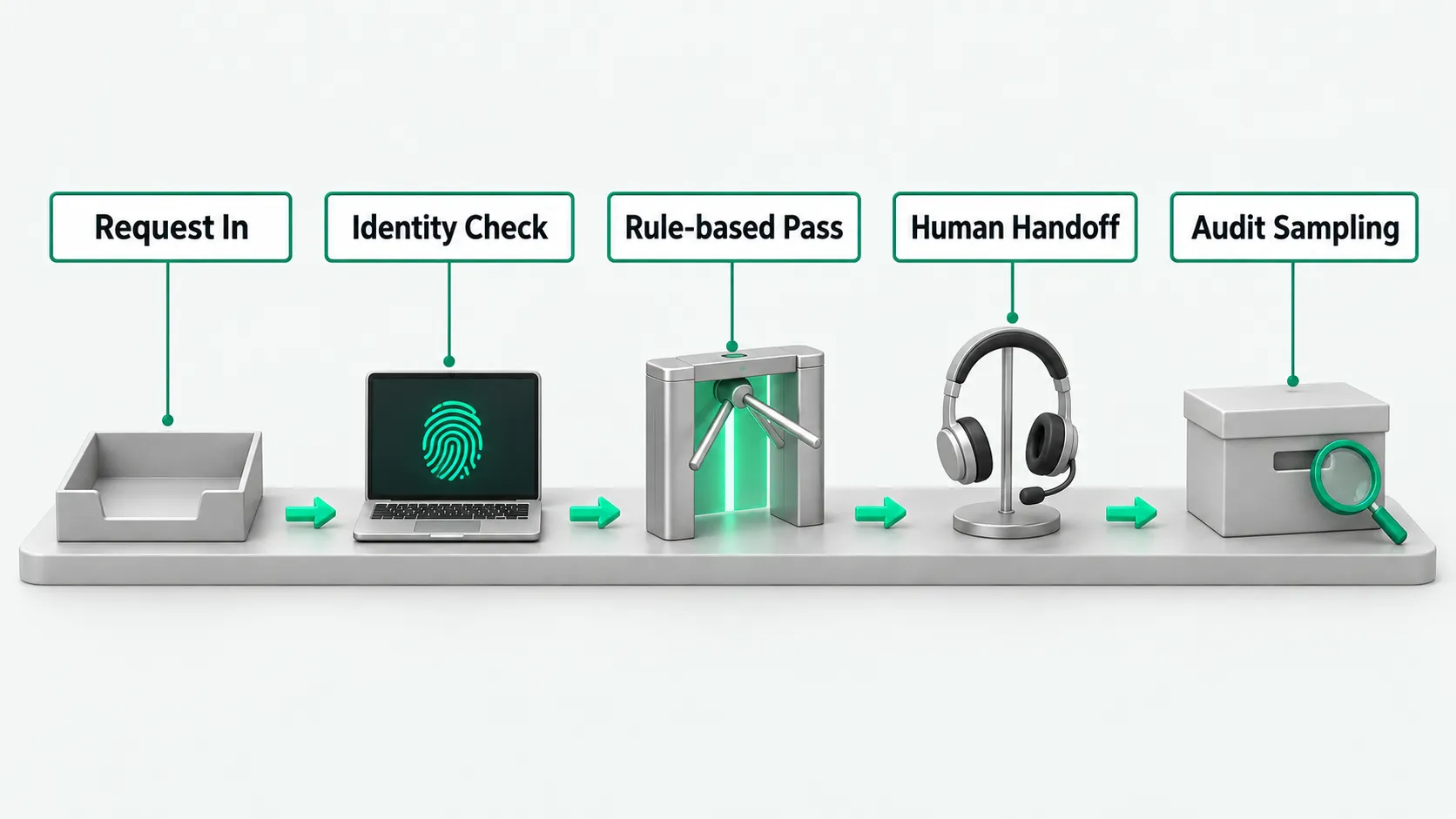
Receive the reset request: identify the account and ticket status
The program first captures the employee ID or email the employee submits at the helpdesk entry point. A back-end interface checks the status in the unified identity system and confirms whether the account is active, temporarily locked, or frozen after the employee left. For people who have left or whose accounts the security team froze, the program stops responding and sends an anomaly alert.
Once the system identifies a valid account, it determines the request type. The program lists options on screen and lets the employee choose: forgotten password, locked out after wrong entries, or a new phone that cannot receive verification codes. The back end creates a separate tracking number for the session and writes the timestamp and network access node into it.
Helpdesk specialists maintain the account classification rules. Regular office accounts, contractor accounts, and core privileged accounts carry different risk tier tags in the system. The tag decides how many credentials later checks need, and whether the program can call the interface directly without human involvement.
Pull registered signals: rule out verbal details that are easy to fake
The program asks the requester for verification credentials and checks them against the registered records. In the past, many companies had human agents ask for an employee’s ID number or start date. Those details are easy to find out at the next desk. For example, someone holding a coworker’s badge can read off the employee ID and department. The program cannot tell real from fake by looking at static text like this.
The system pulls environment and hardware signals that others cannot easily see. The program reads the device fingerprint of the session the employee starts and compares it with the record in the mobile device management system. If the employee is on a company-issued, registered office computer and the current fingerprint matches the record, the program treats that signal as highly trustworthy.
If the employee asks for help from an unmanaged device, the program sends a confirmation card through the instant messaging tool to the mobile device where the employee is already logged in. The back end caps the number of wrong attempts. At the cap, it ends the conversation and alerts the employee’s manager.
Let low-risk actions through: call the interface to send a reset link
When the verification signals match, the program moves to automated handling. For a temporary lockout on a regular role’s account, the program calls the unified identity system’s unlock interface and clears the failed attempt count. For a regular password reset, the system does not send a new password in the chat. It sends a short-lived reset link to the registered email only.
When the program calls external tools and core interfaces, it needs explicit policy constraints. For how to divide rules for automated calls, see Agent Tool Call Auto-Approval: Which Calls to Allow or Block. For routine unlocks that match the whitelist rules, the system completes the interface request and shows on screen that the request is done.
The operations manager defines the list of conditions for automatic approval. Operations staff set approval policies for specific time periods and network zones based on past security incidents. If the system detects a burst of reset requests from one department in a short time, it closes the automatic channel and routes further requests to the human queue.
Block high-risk cases: hand off to a person and bring in the manager
For changes to a multi-factor authentication device or resets of privileged accounts, the program pauses automated changes. If someone impersonates an employee for these actions, core systems can slip out of control. The program packages the device fingerprint, network address, and conversation summary collected so far and hands them to a human support engineer.
For permission changes and actions taken on an employee’s behalf, the underlying identity mechanism sets the security boundary. For where rights and responsibilities sit, see Agent Authentication: Whose Permissions Apply When Calling Systems for Employees?. After taking the ticket, the human engineer pulls up the information the employee registered at onboarding and starts an audio or video check.
Password resets for high-risk accounts also need joint confirmation from the direct manager. The system sends the manager an approval form with the requester, the requested change, and the login location. Only after the manager signs digitally online can the human engineer approve the change in the admin console.
Keep an audit trail: spot-check call history afterward
When the action is complete, the program writes the full process data into the audit log. The log covers the request address, device identifier string, the result of each credential submission, interface input and output messages, and the notes from human approval. The log files go to a separate read-only storage cluster, so history cannot be changed or deleted quietly.
The company security team spot-checks reset logs on a regular schedule. Security specialists sample a set number of closed tickets and check whether the reset time conflicts with the employee’s badge swipes and attendance records. For example, if the badge system shows the employee had not entered the campus when the reset happened and the login came from another city, the record is flagged as a suspicious case for separate review.
Security specialists revise the decision rules based on the spot-check results. If new social engineering scripts try to get around the verification logic, engineers add blocking rules to the preprocessing module and adjust the confidence required for credential checks.
Helpdesk agent: FAQ
Why can’t a helpdesk agent send the employee the new password in the chat?
Sending a new password in plain text in the chat creates a leak risk. People walking past the desk can see the chat window, and the content can be screenshotted and shared. Chat records are also usually stored on the instant messaging system’s servers. The safe approach is to send a single-use reset link to the secure channel registered to the employee, or to generate a temporary password and require the employee to change it at first login.
When an employee says their phone is lost and they cannot log in to any company device, what should a helpdesk agent do?
When every registered device and contact method has failed, the helpdesk agent should stop the automated flow and direct the employee to the in-person channel. The program tells the employee to go to the IT service desk in the office, where an on-site engineer checks the physical badge and employment status. After verifying, the engineer gets the manager’s approval and helps the employee register a new trusted device in the back end.
When an employee changes phones or loses a security key, can a helpdesk agent complete identity verification on its own?
A helpdesk agent cannot complete identity verification for device rebinding without a person involved. Multi-factor credentials are a key line of defense for the corporate network. Once the device is lost, the trusted environment signals are gone, and a text conversation online cannot confirm the person is who they claim to be. In this case a human engineer has to step in and combine audio or video interaction, online manager approval, or an in-person badge check before binding a new hardware credential.