
Enterprise AI
How to Record Lead Source When AI Sorts WhatsApp and Email Inquiries
When AI triages B2B inquiries from WhatsApp, email, and web forms, the lead source field needs fixed rules. Five steps keep channel attribution accurate.

AI triage speeds up handling of leads that arrive on several channels. The lead source field should still not be left for the model to overwrite. B2B buyers move between email, instant messaging, and website forms over the course of one deal. A model can extract product specs and purchase intent. It cannot tell which campaign first brought the buyer to you. The working setup has four parts. The system locks the original channel code when the buyer first makes contact. AI extracts intent and adds business tags. The sales rep verifies the source when creating the account. At month end, the operations team checks attribution against deposit payments and corrects it.
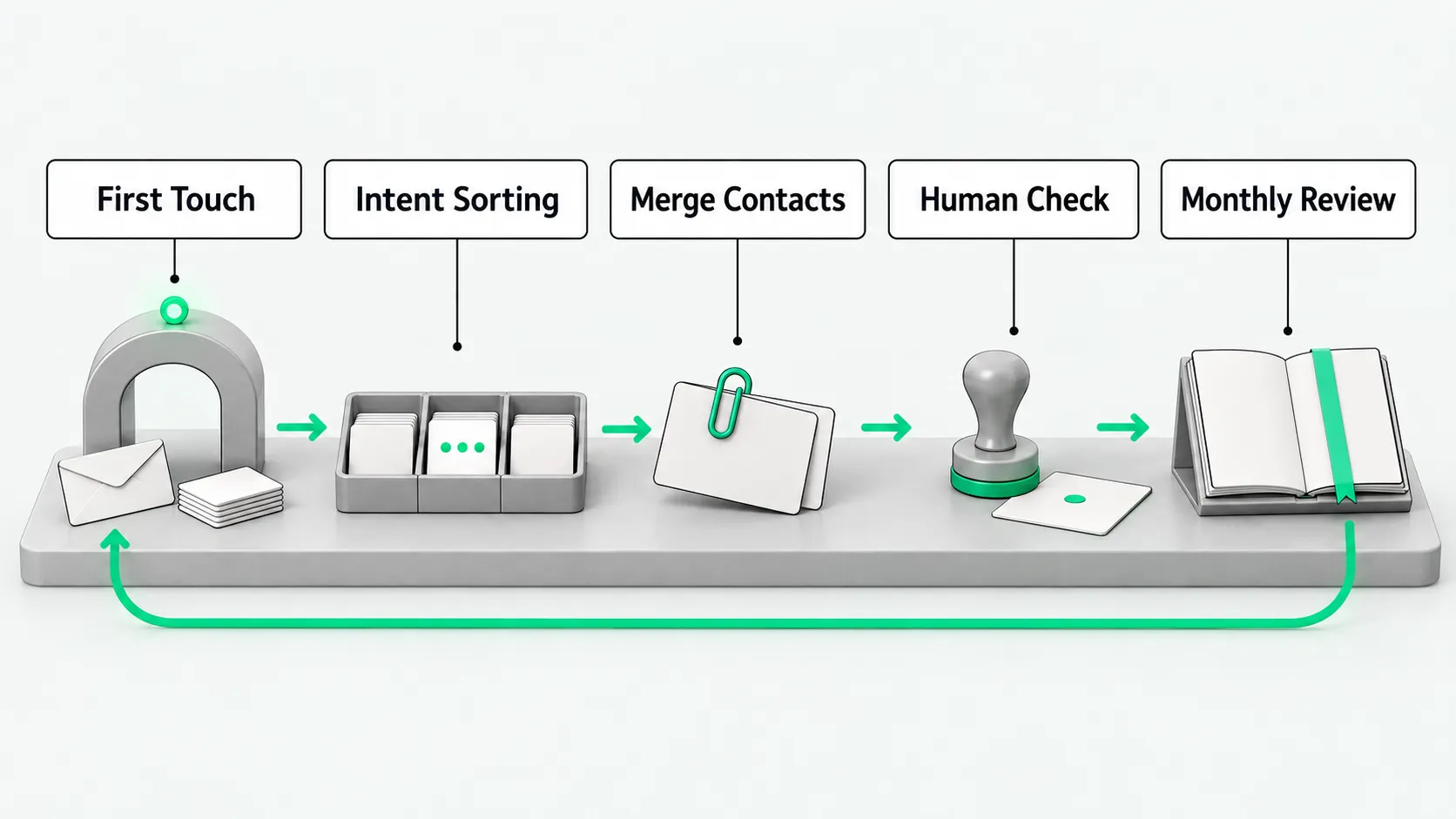
First-touch record: capture the landing entry point and original channel
When a buyer makes first contact, the API gateway captures technical parameters and writes them to the first-touch fields.
A buyer may arrive through an instant messaging API or submit a list through a website form. The gateway pulls key parameters from the message headers: phone country code, landing page tracking code, referrer URL, and timestamp. The system assigns the buyer a unique visitor ID and stores these parameters in read-only base fields on the customer record. Later contact through other channels does not change these fields. For how website traffic and geography are parsed, see GEO for B2B Export Websites: How to Attribute AI-Sourced Inquiries.
A system administrator sets up the channel code mapping table in advance. After the gateway captures the parameters, it pushes the raw message to a pending queue, where the AI triage program picks it up.
Intent sorting: extract business tags and suggest a category
The AI program reads the buyer’s first messages and attachments, extracts purchase intent, and proposes business tags.
The model reads the greeting, the RFQ list, or attachment file names such as drawings. It extracts product category, model and specs, order volume, and buyer type. It then combines this with any source the buyer states, such as having seen your booth at a trade show, and proposes tags. The model can write only to the suggested fields. It has no permission to change the base fields.
The head of sales operations sets the tag dictionary and the confidence threshold. When the model is unsure about intent, the system leaves the field empty for a person to decide. Operations staff spot-check triage records on a schedule. After tagging, AI pushes the record to the assignment pool for a sales rep to pick up.
Merge duplicate contacts: check cross-channel history and keep the first touch
Buyers often email through your website and then send the same request on WhatsApp or another messaging app. The system has to catch duplicate records.
The matching engine searches phone numbers, company email domains, and unique social account IDs. When a new message comes from an email domain that matches a trading company that emailed earlier, the engine raises a merge alert. AI then compares product category and job title across the two records. If they belong to the same purchase project, it suggests merging the new record into the existing master account and filing the message as a follow-up entry.
The rep who owns the account confirms the merge. If the company domain matches but the job titles differ, the rep checks and may mark them as two contacts at the same company, each with its own follow-up card. After the rep confirms, the matching engine updates the linked view. The master account keeps its original first-touch source.
Sales rep confirmation: verify the real channel during follow-up
When the rep gets the buyer on a call or sends a formal reply, the rep asks how the buyer first found the company.
Using the AI’s suggested tags, the rep asks whether the buyer came through a peer referral, a trade show, a search engine, or social media, and fills in the manually confirmed source field in the CRM. If the confirmed answer differs from the technical field, the rep picks the real source from a dropdown and adds a note. For controls on automated follow-up emails that reps schedule, see Which CRM Outbound Agent Emails Need Human Approval Before Sending?.
The CRM blocks reps from overwriting the original technical parameters. Reps can edit only the confirmed-source field. The system logs the editor’s employee ID, the time, and the old and new values. This stops a rep from relabeling an unassigned lead from the shared pool as a personal referral. Once the rep confirms and saves the record, the lead enters the sales pipeline.
Monthly attribution review: correct the rules against closed deals and payments
At the end of each month, the sales director and the marketing operations team compare closed-deal and payment data, then adjust the source rules and the model’s triage logic.
Operations exports the month’s won and lost accounts and cross-checks three data sets: the technical first touch recorded by the system, the source confirmed by the rep, and the records of signed contracts with deposits received. Suppose leads from one messaging channel close at a high rate but show up in the technical record as unknown direct traffic. The team then audits the API configuration to find where the inbound links lost their tracking parameters.
The analytics program produces an attribution report. It compares model scores with deal value and calculates triage accuracy. If the model keeps classifying wholesalers from a particular region as small one-off buyers, operations collects typical examples and revises the model’s classification prompt. The monthly review produces the final channel performance report, which sets the next period’s channel budget.
Inquiry source: FAQ
A buyer emails first and then sends an instant message. Which source should the system keep?
Keep email as the technical first touch and append the messaging history to the record. In export sales, the first contact on the timeline counts, because it shows where the buyer found you. A buyer who switches to a chat app to chase a reply is changing channels during follow-up. The CRM records email in the original source field and attaches the later chat history to the lead’s timeline, so the rep can see the full sequence.
Why shouldn’t sales reps be free to edit the inquiry source field?
Free edits break the basis for evaluating marketing spend. Marketing relies on the technical parameters to measure acquisition cost. If reps relabel leads from paid online campaigns as referrals to improve their own numbers, the company misjudges ad performance and may cut budget from channels that work. Make the technical parameters non-editable, put the rep’s verified information in a separate confirmed-source field, and keep an edit log. This keeps the data accurate and still records what the rep learned.
For WhatsApp inquiries and similar messaging channels, how do you stop reps from changing attribution fields on their own?
At the gateway level, let incoming messages write to the CRM customer record, and give reps no way to edit those fields. For every conversation that comes in through the official WhatsApp Business API, the system writes the phone number, ad identifier, and record creation time, and reps get view-only access. Anything a rep adds during follow-up goes in the notes and cannot overwrite the WhatsApp inquiry tag the system assigned. At the monthly review, the system exports the manual edit log for operations to check, so channel attribution stays accurate.