
AI Safety
After an Agent Model Upgrade, Workflow Results Changed. What Now?
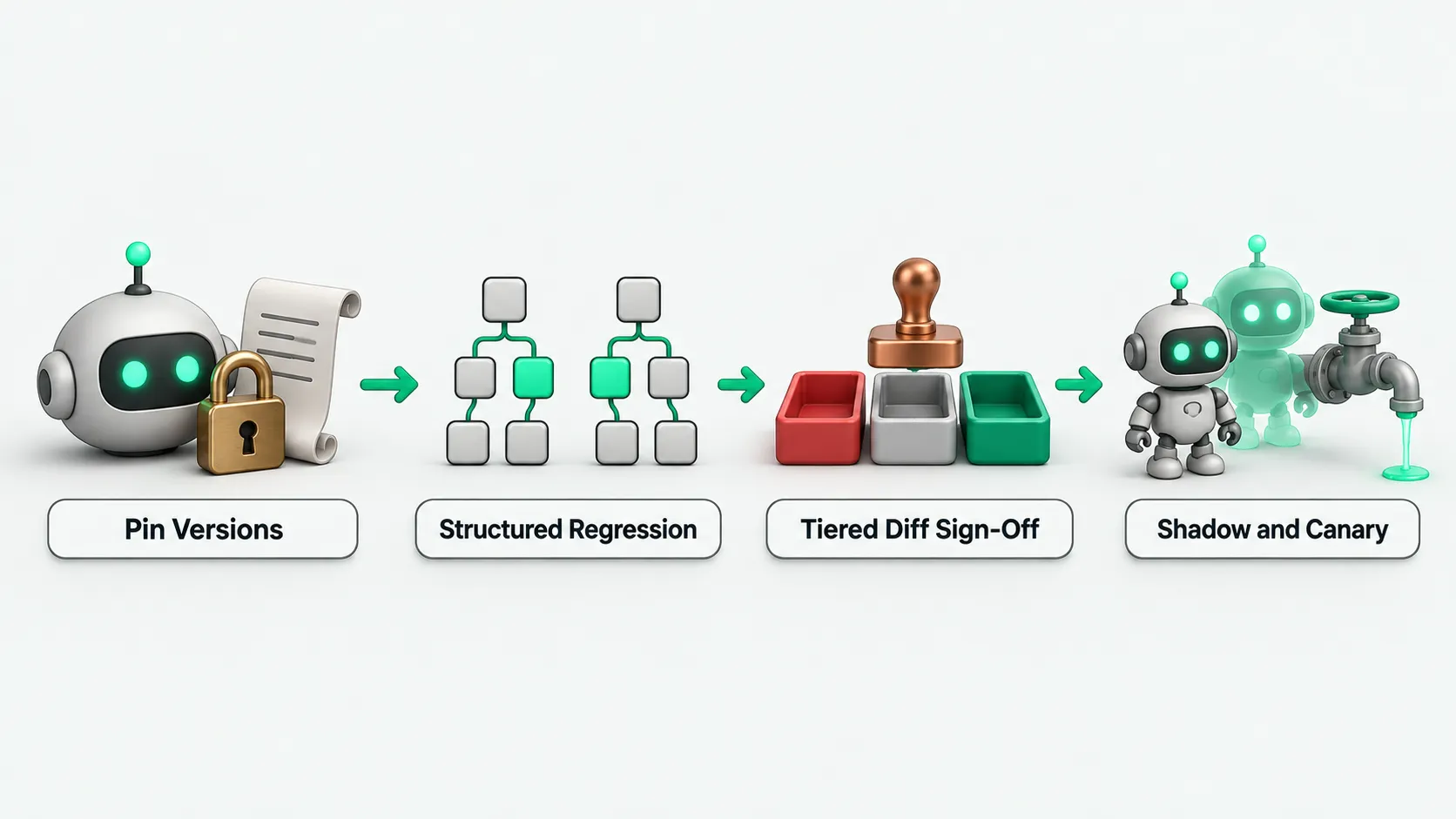
When a company upgrades an agent's model or investigates a change in production behavior, it first checks the model, prompt, and tool definition versions recorded in the run logs. It then runs regression tests on a locked test set and compares tool call structure. The business process owner and the quality or risk team sign off together on a staged rollout.

If production workflow results change after an agent model upgrade, check the run logs first. Confirm the model version, prompt version, and tool definition version that actually served the requests. Then run regression tests on a locked test set and compare the old and new versions’ tool call structure and outputs, case by case. If a red-line case fails, the upgrade is blocked. If the call structure changed, the business process owner decides case by case whether the change is acceptable. The business owner and the quality or risk team sign off on switching traffic. The engineering team does not decide alone.
First confirm whether the model changed
An agent’s behavior is set by three things together: the model version, the prompt version, and the tool definition version. Releasing a change to any one of them is a deployment. If API calls use a floating alias for a model family instead of a specific dated version, the provider may swap in a new version with different behavior behind that alias. Not one line of code in the repository changed, yet the evaluation that passed last week was run against a different model.
Routine calls can be configured to pin a specific dated version, and each run log records the model version, prompt version, and tool definition version that actually served it. Some APIs return the name of the model that actually served the request in the response, and the system can be configured to read it back and check. Any change to the prompt, the model, the tool definitions, or the retrieval settings means re-running the full regression suite. A change in retrieval chunking, an extra field in a tool response, or a longer conversation history can also push content the agent relied on out of its view. Production often shows no errors, and the answers still read fluently, but the basis for the agent’s decisions has changed.
What regression tests compare
For an agent model upgrade, regression tests use a locked test set: representative common requests, a few edge cases, and at least one red-line case that tests a rule that must never break, such as handing off to a person when a request exceeds the authorized limit. Do not edit the test set casually. Once it changes, results cannot be compared with earlier runs. When switching models, change only the model. Keep the prompt, the tool definitions, the test data returned by tools, the test set, the grading method, and the inference parameters fixed. Different models accept different parameters, and a parameter set on one side may be ignored on the other, so check before running. Before and after the upgrade, compare three areas:
- Tool calls and parameters: check that the right tool was called and that the parameter values and formats passed in are correct.
- Policy compliance and follow-up questions: check that the agent followed business rules and knew to ask first when information was missing. Comparing only the final reply text marks a result as failed when the wording differs but the task was done correctly.
- Self-checks on test cases and graders: for a case that fails on both old and new versions, first check whether the test itself is broken. If a grader gives full marks to any answer, it tests nothing. Feed it a known wrong answer and see whether the score moves. Run the same case several times to rule out random noise. For how, see Agent Evaluation: How Many Runs per Task Are Enough?.
How to tier differences, and who decides
After running the locked test set, do not look only at the overall pass rate. A score drop on a single case also counts as a regression. The engineering team lists every difference between the old and new versions, sorts them into three risk classes, and sends them to the owner for each class to rule on one by one:
- Hard red line broken: hard red lines have no tolerance threshold. A single break goes to human review at once, and the version cannot ship until it is fixed.
- Call structure changed: the order of tool calls, how parameters are organized, or follow-up behavior when information is missing has changed. The business process owner decides case by case whether the change is acceptable for the business.
- Style and wording changed: the tool call chain and business conclusion are the same and only the wording style differs. The business side confirms these as ordinary judgment calls.
After every difference on the list is checked, the business owner and the quality or risk team sign off together on whether the new version can take traffic. The engineering team provides only the evaluation comparison report and does not decide the switch itself.
How to roll out the new version in stages
After business and risk sign off, the new version still cannot replace the old one all at once. The production release moves through four stages, and in-flight workflows are kept isolated and protected:
- Shadow run: the system can be configured to run the old and new versions in parallel on real production traffic. Only the old version’s results go out. The behavior differences are compared offline.
- Small canary: start with internal workflows or low-risk business on a small share of traffic. For what else to check when moving from pilot to production, see Your AI Agent Pilot Works. What Does It Need Before Production?.
- Expand on metrics, freeze on regression: increase traffic step by step only while evaluation metrics and production guardrail metrics stay normal. Freeze as soon as a regression appears.
- Keep the old version callable, and do not switch in-flight runs: the previous version stays callable. A workflow already running finishes on the version tagged when it started, and does not switch models midway.
Agent model upgrades: FAQ
Not one line of code in the repository changed. Why did the agent’s behavior suddenly change?
A common cause is calling the API with a floating alias that has no date, so the provider swapped in a new version behind the alias. Other causes are a change in retrieval chunking, an extra field in a tool response, or a longer conversation history that pushed content the agent relied on out of view. To investigate, start with the run logs and check the model version, prompt version, and tool definition version that actually served the requests.
During the switch, will workflows already running move to the new model midway?
No. During the upgrade, the previous version stays callable. Workflows already in flight finish on the version tagged when they started and do not switch models midway. Only workflows started after the switch enter the new version, under the canary rules.
The vendor says the new model is stronger. Do we still need to run the full regression suite?
Yes, the full suite. A new version can score higher on public external benchmarks and still do worse on your specific tasks. The vendor’s release notes do not replace the company’s own testing. Every upgrade runs the full regression on the locked test set, and no red-line case may fail.