
AI Safety
How Do You Keep a Prompt Library From Spreading Unchecked?
When departments maintain separate spreadsheets, a prompt library often mixes in credentials and internal rules. Companies can inventory prompts, assign owners, strip sensitive data, and tier reviews.

A prompt library cannot be left scattered across local spreadsheets or shared documents maintained separately by each business team; companies need to bring active prompts under unified management as formal assets. Start with a full inventory of existing prompts across departments, listing storage locations, authors, and linked workflows, and mark unclaimed prompts as inactive first. When registering prompts into the library, record the owner, purpose, target model, version, and last review date. Before registration, strip out account passwords, internal limits, and customer data, keeping permissions and limit controls in systems outside the model. Approve prompts by risk tier based on use case, and run a centralized review whenever models change or workflows are adjusted.
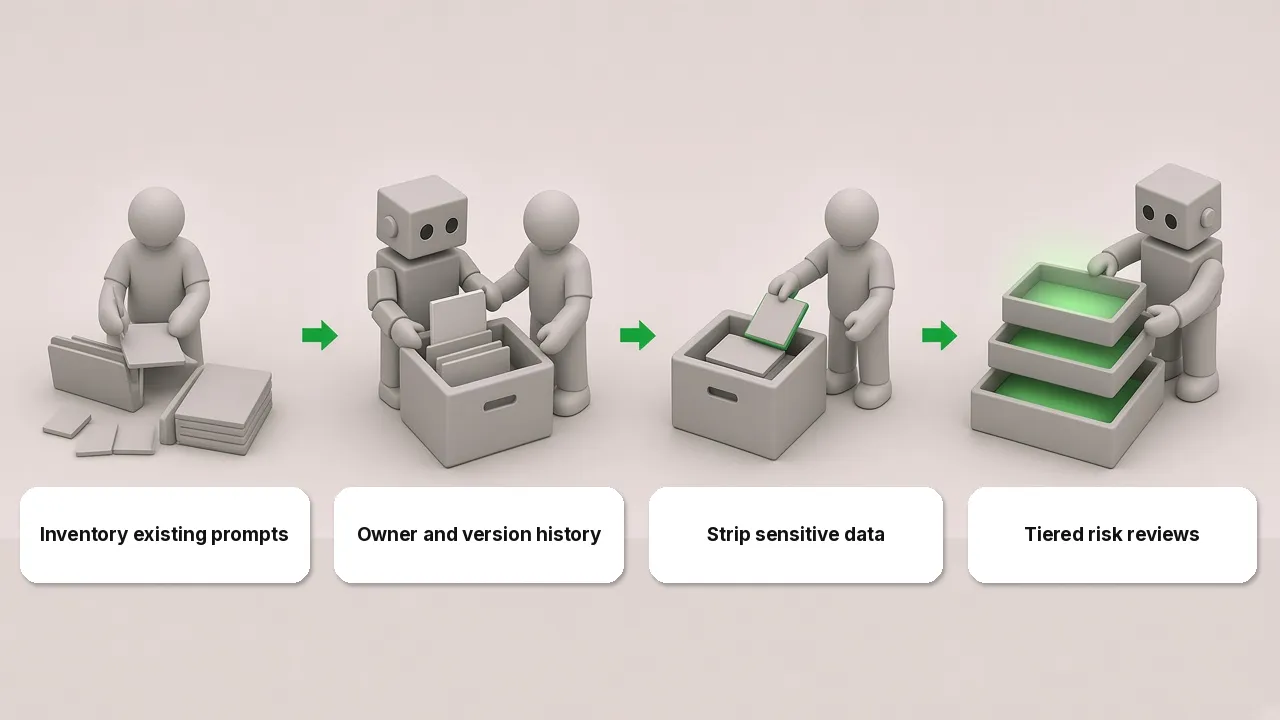
First inventory prompts scattered across departments
In many companies, business departments build their own prompt library, piling prompts into shared documents where some contain internal rules, approval limits, or even account credentials, and over time no one can tell which ones are still in use. The first step in consolidation is a full inventory, where the IT department works with business line leads to locate prompts scattered across personal spreadsheets, department docs, and workflow nodes and compile a single list.
This inventory list should record where each prompt lives, who wrote it, and which workflow it connects to. During the inventory, teams often find legacy prompts whose original author has changed roles or left the company, and the department can no longer explain which task the prompt serves. Mark unclaimed prompts as inactive first, observe for a period to confirm no business operations are affected, and then remove them. Inventorying prompts often uncovers automation workflows built privately by departments as well, so prompts and employee-built agents can be inventoried together; for how to do that, see Agent Management Starts With an Inventory: Who Runs Employee-Built Agents?.
Require an owner and version history at registration
After the initial inventory is complete, retained prompts should be migrated into the company’s unified prompt library rather than left in online spreadsheets that anyone can edit at will. Every prompt entered into the library needs an owner, purpose, target model, version, and last review date. Even for a short instruction of a few sentences, once it is wired into daily office work or business workflows, the ledger must show a corresponding maintainer.
Routine edits to prompts must go through version records rather than overwriting the original text directly. When business staff adjust a prompt’s wording, output format, or decision criteria, they generate a new version in the library, record the reason for the change, the editor, and the effective date, and keep historical versions for comparison and rollback. Some tools support permission controls and change logs for prompt entries, which a company can configure so that only registered owners and reviewers can submit new versions, preventing others from making casual edits in shared documents.
Strip sensitive data and keep permission controls outside before registration
Before prompts enter the library, review them one by one to strip out any embedded sensitive information. According to the LLM application risk checklist published by OWASP, system prompts are used to guide model behavior and may contain sensitive information that should not be discovered; system prompts should not be treated as secrets or used as security controls, and sensitive data such as credentials and connection strings should not be placed in system prompts. The risk examples listed on that page include prompts exposing sensitive functionality or system architecture, exposing internal decision rules such as transaction limits, exposing filtering criteria, and exposing permissions and user role structures.
Accordingly, when companies carry out prompt governance, they must screen text before registration and leave out account passwords, internal limits, and customer data. The LLM application risk checklist published by OWASP recommends placing sensitive information in systems that the model does not directly access and relying on systems outside the model rather than relying on system prompts for strict behavioral control. In daily management, prompts contain only task instructions, while permissions and limits are enforced in external systems. Business reference materials needed during task execution are also managed separately rather than stuffed into prompt text; see Enterprise Context Engineering: Making Company Knowledge Usable by AI Agents.
Manage by risk tier and run periodic centralized reviews
Holding every everyday prompt for review by the information security team quickly pushes business departments to bypass the unified library and build their own spreadsheets again. A more practical approach to prompt governance is tiering by risk: general writing prompts used for polishing emails, summarizing meeting notes, or drafting routine copy neither touch core data nor trigger external actions, so departments can manage those themselves.
Once a prompt connects to a business system or can trigger actions, information security must review it to confirm it carries no sensitive credentials or privilege escalation risks before it goes live. In addition, whenever a model is replaced or a workflow changes, the relevant departments should pull the associated prompts for a centralized review to verify whether existing instructions still hold under the new model or workflow, retiring outdated prompts promptly. The review frequency is set by the company itself.
Prompt library: FAQ
Do prompts saved by individual employees for personal use need to go into the prompt library?
Prompts that individual employees use in daily work to help write weekly updates, translate paragraphs, or brainstorm, and that do not connect to enterprise business systems, are not shared with others, and contain no internal sensitive information, can stay in personal notes without being added to the company’s unified prompt library. Once a prompt is shared within a team or embedded into a fixed business workflow, it must be registered with an owner and managed in the library.
If a prompt includes internal workflow steps, does that count as a leak?
That depends on the specific content written into it. If it only states public business steps or general formatting instructions, no confidential information is involved; if it includes internal decision rules such as transaction limits, sensitive functionality or system architecture, or filtering criteria, or exposes permissions and user role structures, leaking the system prompt exposes internal information. Such internal rules and permission controls belong in systems outside the model rather than inside the prompt.
Should prompt governance belong to IT or business departments?
Prompt governance requires a division of labor across business departments, IT, and information security. General writing prompts are managed by business departments themselves; IT provides the unified prompt library ledger and version tracking tools; prompts that connect to business systems or trigger actions are drafted by business departments and go live after information security reviews them.